
↓
- SaaS Marketplace↓
- HR, Recruiting↓
- Leavo Promo Code

Leavo
25% CASHBACK All Plans. 3 Years. *
Save up to $13/year
Leavo owned by Cappsule is a leave management plateform to streamline time-off requests and holiday tracking.

Share deal
* With NachoPay:25% CASHBACK All Plans. 3 Years.Save up to $13/year
With any payment method:10% CASHBACK All Plans. 3 Years.Save up to $5.20/year
Redeem dealExclusive NachoNacho offer — must be redeemed through NachoNacho to qualifySavings Summary:
Pay with a NachoCard to get 25% cashback on all Leavo plans for three years, saving up to $13/year. Without a NachoCard, get 10% cashback for three years, saving up to $5.20/year. Leavo brings leave management, time tracking, shift planning, overtime banking and collective-agreement compliance checks into one HR platform.
Deal eligibility requirements
This deal is for new Leavo users. All NachoNacho customers are eligible.
What is Leavo?
Leave, time, and shift management in one platform
Manage employee time off, tracked hours, shift schedules, and overtime from one workspace. Employees can submit leave requests and check their balances, while managers review approvals and use a team calendar to see who is available.
- Leave management: Configure leave types, accrual and carry-over rules, approval workflows, and holiday calendars. Balances update as requests are processed.
- Time and shifts: Track clock-ins and timesheets, publish shift schedules, and bank overtime for time off.
- Compliance controls: Check shifts and timesheets against working-time and rest rules using Swiss and French collective-agreement presets or a custom agreement.
- AI assistant: Ask about balances, team availability and policies, or request leave using chat or voice.
Leavo screenshots and videos
Leavo Introduction Leave Calendar showing pending and confirmed leaves for all Team members Check Allowances per employee and used balances List all Leave requests and their status - Export CSV or Excel for record or audit needs Manage employees , their schedule, holidays and leave policies Offering some employees a day off ? Leavo allows quick Manual leave adjustement
Key benefits of using Leavo?
- Keep workforce management in one place: Manage leave, time tracking, shift planning, and overtime without switching between separate tools.
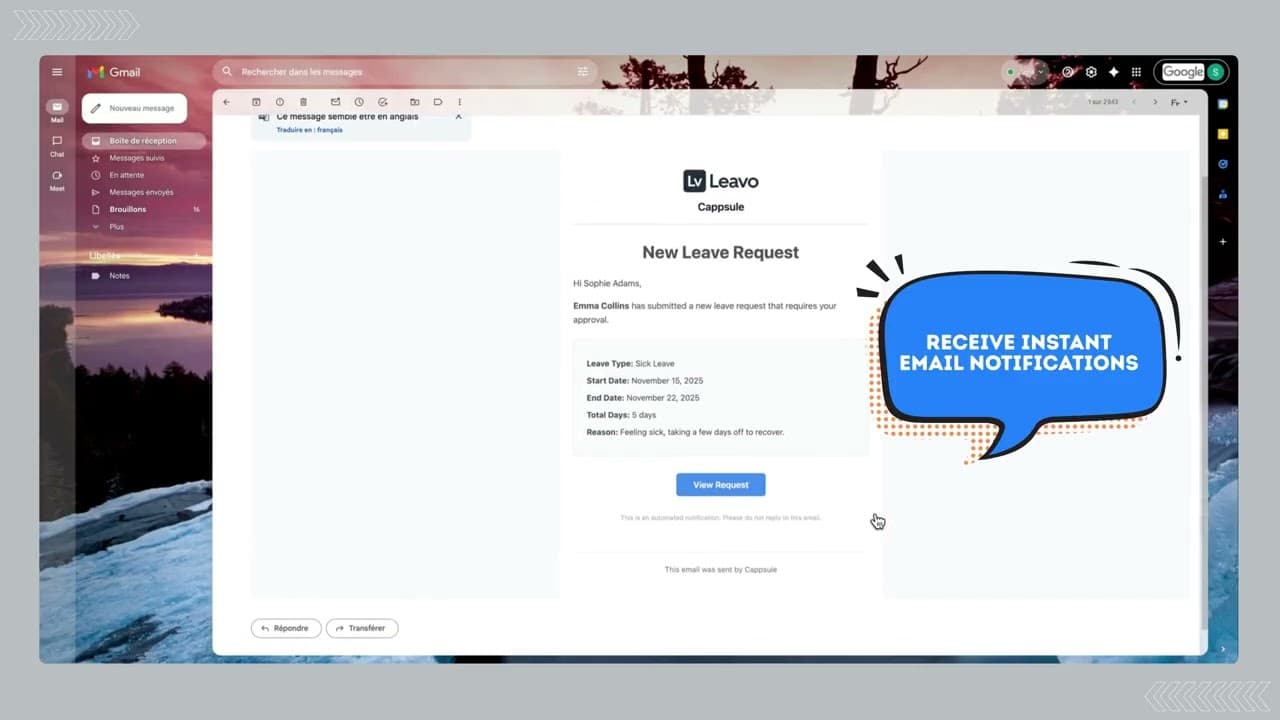
- Reduce leave administration: Route requests for approval, calculate balances automatically, and notify employees and managers of updates.
- Plan with a clearer view of availability: Use the team calendar and shift-planning views to see absences, holidays, and coverage before finalizing schedules.
- Make leave policies fit your team: Configure leave types, allowances, accrual rules, carry-over, and approval workflows.
- Give employees faster answers: Leavo AI lets them check balances, ask about policies, and request time off in plain language.
- Keep hours accountable: Validate timesheets and review an immutable before-and-after record of time-tracking edits.
- Connect overtime to time off: Bank confirmed overtime hours and convert them into leave using a configurable rate.
- Support working-time compliance: Check shifts and timesheets against working-hour and rest rules, using Swiss and French collective-agreement presets or a custom agreement.
Leavo Features
- Leave requests and approvals: Employees submit time-off requests, while managers use configurable approval workflows to approve or decline them.
- Leave policies and balances: Configure leave types, accrual rules and carry-over limits, with balances updated automatically.
- Team calendar: View time off and availability by day, week or month to spot overlaps.
- Public holidays and schedules: Use country-specific holiday calendars and define working schedules for employees.
- AI assistant: Check balances, ask about leave policies and book time off using natural language.
- Time tracking: Record clock-in and clock-out times, calculate worked hours and breaks, and submit timesheets for validation.
- Shift planning: Build schedules with reusable shift templates, review coverage, and publish and lock plans.
- Overtime banking: Track banked hours, record payouts and convert eligible overtime into paid time off.
- Compliance checks: Check shifts and timesheets against configured working-time and rest rules.
- Multi-company management: Manage separate organizations, teams and policies from one dashboard.
- Notifications and audit records: Alert teams to requests and schedule updates, and retain records of time and overtime changes.
Leavo Pricing
- Free trial — $0 for 30 days. Full access for unlimited members, with no credit card required.
- Professional — $2.50 per user per month. The listed example is $450 per year for 15 members. Includes unlimited team members, one organization, leave management, time tracking, shift planning, an AI assistant with a higher usage quota, and hours balance and overtime banking.
- Premium — $4.17 per user per month. The listed example is $750 per year for 15 members. Includes everything in Professional, plus unlimited organizations, the maximum AI assistant quota, the option to buy extra AI credits for a shared company pool, a dedicated account manager, and priority support.Included across plans: Team calendar, leave requests and approvals, leave policies and allowances, balance tracking, holiday sets, schedules, time tracking and validation, badge or clock devices, an immutable audit trail, shift planning, CCT/CCN compliance, notifications, document management, Google Sign-In, and CSV member import.
Leavo pricing
Free trialView pricing plan details
Pricing last verified November 3, 2026.
Compare Leavo
Side-by-side comparisons of Leavo against the products it is most often weighed up against.
Leavo alternatives
Products that do a similar job to Leavo, each with its own NachoNacho deal.

Leavo Discount Available
25% CASHBACK All Plans. 3 Years.
Save up to $13/year
Get 25% CASHBACK with our exclusive Leavo deal by subscribing from the NachoNacho marketplace. NachoNacho is the best way to buy SaaS with exclusive promo codes, coupons, and deals.

Leavo reviews
0 verified reviews from NachoNacho members
No reviews yet
Be the first to tell other founders what this tool is like to use.
Frequently asked questions about Leavo
Leavo offers a 30-day free trial with full access, unlimited members, and no credit card required. Professional is listed at $2.50 per user per month, while Premium is $4.17 per user per month. Premium adds unlimited organizations, a larger AI assistant quota, a dedicated account manager, and priority support. There is no free plan listed beyond the trial.
Leavo may suit a small business that wants leave requests, timesheets, shift planning, and overtime records in one workspace. Managers can configure approval workflows and leave rules, while employees can check balances and request time off. If a team only needs a basic absence calendar, it should weigh those broader features against Leavo’s per-user pricing.
Leavo is most relevant to businesses managing both employee absences and scheduled or tracked working hours. Teams that need shift coverage views, timesheet validation, or overtime converted into leave can use those functions alongside leave approvals. Organizations with distinct companies or policies may also benefit from Premium’s multi-organization management; Professional includes one organization.
Check whether your team will use Leavo’s time tracking, shift planning, and overtime banking as well as its leave management features. Those capabilities make it a broader workforce management tool than a leave-only tracker. Also consider your number of organizations: Professional includes one, while Premium supports unlimited organizations. The available product information does not establish how Leavo compares on price with specific competitors.
Leavo is a platform for managing employee leave, working hours, shifts, and overtime in one workspace. Employees can submit time-off requests and view balances; managers can review approvals and check team availability. It also supports working schedules, holiday calendars, timesheets, and shift plans, so teams can coordinate absences with day-to-day staffing.
Yes. Leavo’s AI assistant lets employees request leave and ask about their balances or leave policies using natural-language chat or voice. It can also answer questions about team availability. AI usage quotas differ by plan, with a higher quota in Professional and the maximum quota in Premium, so buyers should check the plan that fits their expected use.
Yes. Leavo records clock-ins and clock-outs, calculates worked hours and breaks, and lets teams submit timesheets for validation. Managers can build schedules with reusable shift templates, review coverage, and publish and lock plans. Keeping these functions alongside the team leave calendar helps managers consider planned absences before finalizing shifts.
Yes. Leavo can bank confirmed overtime hours and convert eligible hours into paid time off using a configurable conversion rate. Teams can also record overtime payouts and review changes to overtime records. This is useful when a business needs to track both the hours employees work and how those hours are later compensated.
Leavo checks shifts and timesheets against configured working-time and rest rules. It provides Swiss and French collective-agreement presets, as well as the option to configure a custom agreement. These checks can help teams flag scheduling or timesheet issues, but buyers should confirm that the configured rules match the agreements and obligations applicable to their workforce.
Leavo retains an immutable before-and-after record of time-tracking edits, giving managers a way to review what changed. It also supports timesheet validation and keeps records of overtime changes. These records can help teams investigate discrepancies in worked hours, while notifications alert employees and managers to relevant requests and schedule updates.